





You clicked Save. The software swore it worked. Then the data vanished.
You click Save.
Nothing unusual there.
Tiny little button.
Tiny little message.
“Saved Successfully.”
And just like that, your brain moves on.
You close the tab.
Switch devices.
Walk into a meeting.
Shut the laptop lid with the quiet confidence of someone who believes the job is done.
Then later . . .
The draft is gone.
Pretty typical, right?
Most of us have experienced some version of this at least once. Maybe it was a notes app. Maybe a CRM entry. Maybe a document editor that proudly announced your work was “saved” while apparently crossing its fingers behind its back.
The interesting part isn’t the bug.
Software has bugs. Always has. Always will.
The interesting part is how much authority we give tiny interface messages.
The Green Checkmark Problem
We treat confirmation messages as evidence.
That’s the mechanism.
The moment software says:
- Saved
- Uploaded
- Synced
- Completed
- Sent
. . . we mentally close the loop.
We stop checking.
Not because we’re lazy.
Because the system said we were good to go.
Modern interfaces are very, very good at signaling certainty.
Little green checkmarks.
Smooth animations.
Perky success banners.
Cloud icons with reassuring little spinny things.
The software equivalent of:
“Trust me, bro.”
Most of the time, that works perfectly fine.
But sometimes the interface and the underlying system quietly drift apart.
And that’s where things get weird.
“Saved” Is Not a Single Event
Saving data sounds simple.
It usually isn’t.
In older desktop software, Save often meant:
write file directly to local disk.
Done.
Modern systems? Hoooo boy.
Now the process may involve:
- local cache updates
- autosave queues
- sync services
- cloud replication
- temporary storage
- retry systems
- background workers
- offline modes
- version reconciliation across devices
By the time your document reaches permanent storage, it may have passed through more layers than a Star Trek holodeck safety protocol.
And somewhere in all of that complexity, systems sometimes cheat a little on timing.
The interface says:
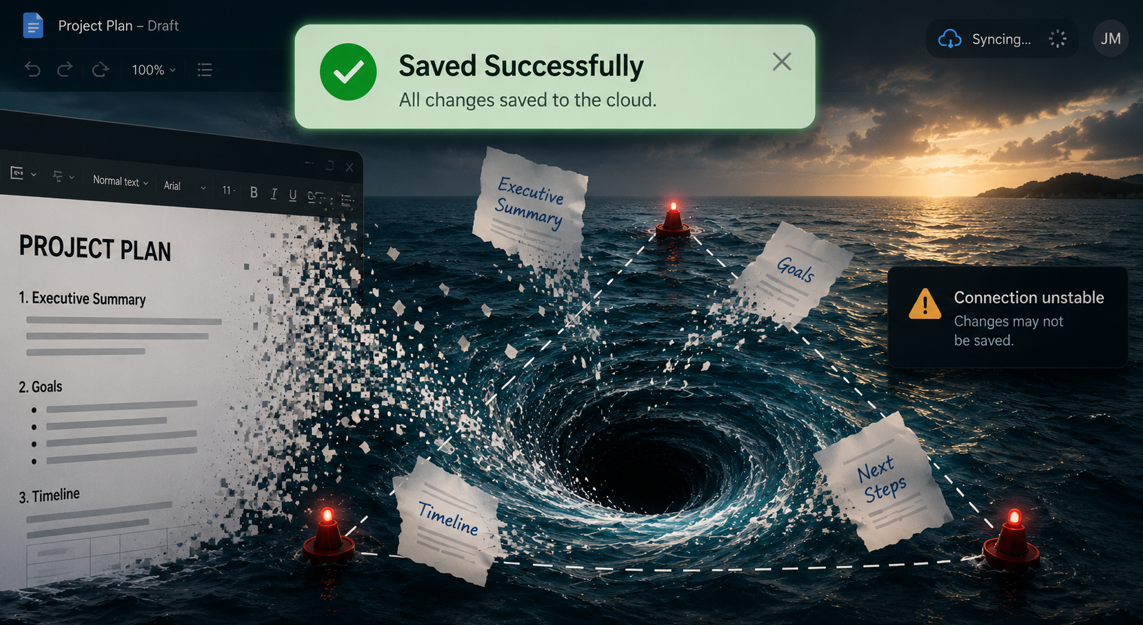
“Saved Successfully.”
What it may actually mean is:
“We have received your request and are optimistic about future developments.”
Not quite the same thing.
Phantom Saves
One of the nastiest versions is the phantom save.
That’s when the interface confirms the action . . . but the data never actually makes it where it needed to go.
Maybe the sync stalled.
Maybe the network dropped.
Maybe the browser tab closed before the queue flushed.
Maybe two devices overwrote each other.
Maybe the backend coughed up a hairball and nobody noticed.
The user experience still looked successful.
That’s the dangerous part.
Because we are heavily influenced by completion signals.
Once software presents a task as complete, most people stop allocating attention to it. The mental checkbox gets checked.
That behavior makes perfect sense.
It’s efficient.
But . . . Efficient trust becomes fragile trust when the confirmation message represents intent instead of verification.
Autosave Changed Human Behavior
Autosave is fascinating because it quietly retrained all of us.
People used to manually save constantly.
Ctrl-S.
Ctrl-S.
Ctrl-S like a little nervous tic.
Every few minutes.
Every paragraph.
Every time lightning struck within 50 miles.
Now?
A whole generation just assumes persistence happens automatically in the background.
And honestly, most of the time, that works.
Until it doesn’t.
Because invisible automation changes human attention.
That’s the real pattern underneath this whole thing.
When systems become reliable enough, we stop monitoring them manually. The trust shifts from:
“I saved the file.”
to:
“The system handles saving.”
And when the system fails, we frequently don’t discover it until recovery is impossible. And the panic sets in.
The Interface Isn’t the System
This is one of the easiest traps in software.
People confuse the interface with the underlying state of the system.
But interfaces are storytelling layers.
Their job is to translate complicated backend behavior into something we can understand quickly.
Sometimes that translation is slightly . . . optimistic.
A spinning sync icon does not guarantee successful replication.
A “draft saved” message does not guarantee durable storage.
A green checkmark does not prove the backend committed the transaction.
Visibility isn’t verification.
That little success message may simply mean:
“The front-end believes things are probably hunky-dory.”
The Quiet Tradeoff
Autosave and cloud sync are genuinely wonderful most of the time. They prevent massive amounts of data loss compared to older systems.
But modern convenience changes where trust lives.
Older systems failed loudly.
Newer systems often fail quietly and convincingly.
That’s the difference.
A floppy disk corruption error in 1994 practically arrived with air raid sirens and emotional trauma.
Modern failures are sneakier.
The interface still looks calm.
Still looks successful.
Still says everything is fine.
Meanwhile your draft is somewhere in the technological equivalent of the Bermuda Triangle.
A Better Rule
Confirmation messages should confirm outcomes, not attempts.
That sounds obvious.
It really isn’t.
A lot of software signals success far earlier than users assume.
And once we see a completion signal, behavior changes immediately. Attention moves elsewhere. Verification stops. Trust transfers to the system.
That tiny green message carries far more psychological weight than most software and UI designers realize.
Because the moment software says “Saved Successfully,” most of us stop asking questions.
Sometimes a little too soon.
Jana Diamond
Jana Diamond, PMP, is a Technical Project Manager at Protovate with a career spanning software development and Department of Defense programs. She’s known for bridging technical detail with practical execution—and for asking the questions that keep projects honest. When she’s not working, she’s likely reading science fiction or hunting down her next salt and pepper shaker set.